Rules Engine
The rules engine lets you intercept requests passing through peekr and block, modify, or pause (breakpoint) them — without touching the upstream server.
Rules are evaluated in memory and take effect immediately. No restart required.
What Rules Do
| Action | Behavior |
|---|---|
| Block | Returns 403 Forbidden to the client. The request never reaches the upstream server. |
| Modify | Mutates request and/or response headers and body before forwarding/returning. The upstream server is still contacted (unless noForward is set). |
| Breakpoint | Pauses the request at a configured phase so you can inspect and manually resume it from the dashboard. |
Rule Fields
Each rule has the following fields:
| Field | Required | Description |
|---|---|---|
host |
Yes | Exact hostname to match (e.g. api.example.com) |
method |
Yes | HTTP method to match, or * for all methods |
path |
Yes | Path prefix to match (e.g. /api/v1 matches /api/v1/users) |
action |
Yes | "block", "modify", or "breakpoint" |
direction |
No | "IN" (incoming), "OUT" (outgoing), or omit to match both |
modifyConfig |
Only for modify | Object describing mutations to apply to the request/response |
phase |
Only for breakpoint | "request", "response", or "both" — when to pause |
Modify Config
modifyConfig describes what to change before forwarding (request side) and before returning (response side):
{
  "req": {
    "setBody": "{\"patched\": true}",
    "setHeaders": { "x-custom": "value" },
    "removeHeaders": ["authorization"]
  },
  "res": {
    "setBody": "{\"mocked\": true}",
    "setHeaders": { "x-injected": "1" },
    "removeHeaders": ["set-cookie"]
  },
  "noForward": false
}
All fields within req and res are optional. Set noForward: true to skip the upstream entirely and return the modified (or empty) response directly.
Header key normalization
Incoming header keys are normalized to lowercase before matching. Use lowercase keys in setHeaders and removeHeaders.
Matching Logic
When a request arrives, peekr evaluates rules in order. The first match wins:
- Host -- Exact match against the request's hostname.
- Method -- Exact match, or
*matches any method. - Path -- Prefix match. Rule path
/apimatches request paths/api,/api/users,/api/v1/data, etc. - Direction -- If set, only matches
IN(reverse proxy) orOUT(outgoing proxy) traffic.
If no rule matches, the request is forwarded to the upstream server normally.
Creating Rules
From the Context Menu
The fastest way to create a rule:
- Right-click a request row in the dashboard.
- Select Block this host or Modify this host.
- The rule is created immediately. For modify rules, the rules drawer opens so you can configure the mutations.
From the Rules Drawer
For full control over rule parameters:
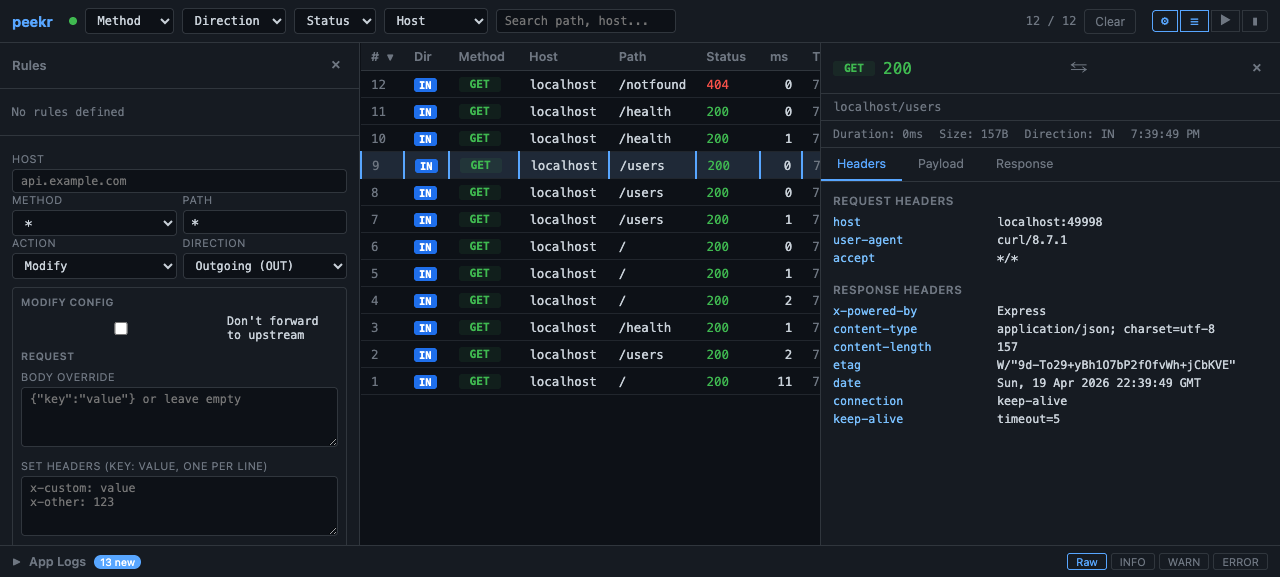
- Click the gear icon (⚙) in the top bar to open the rules drawer.
- Fill in the form fields: host, method, path, action, direction.
- For Modify rules, fill in the request/response mutation fields.
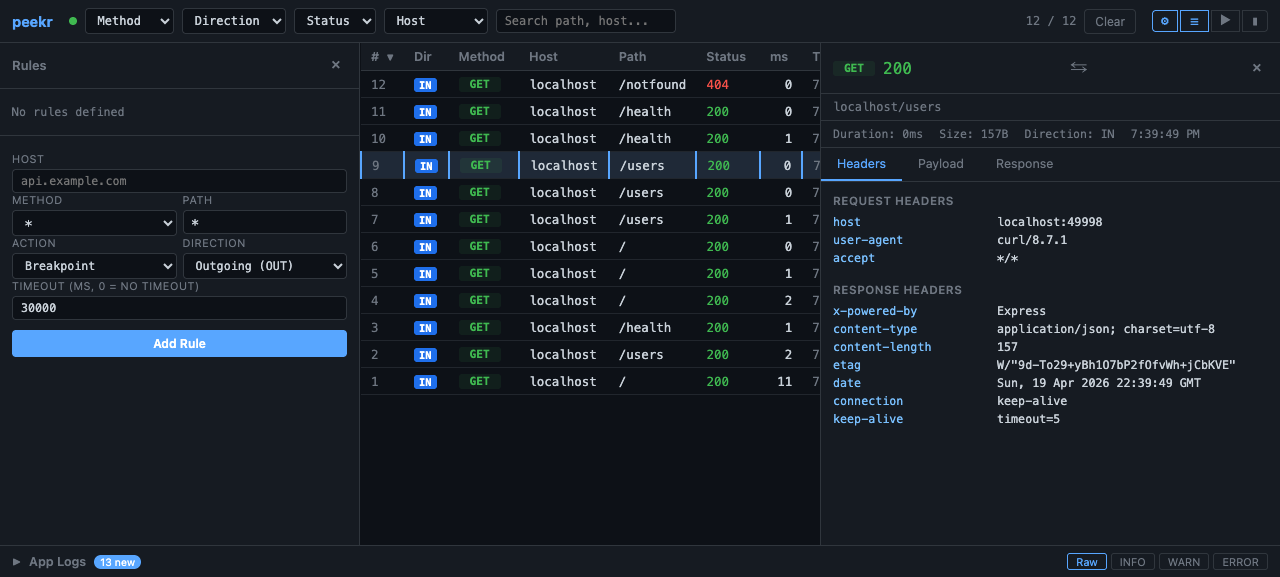
- For Breakpoint rules, select the phase to pause at.
- Click Add Rule to create it.
From the API
Use the REST API for programmatic rule management. See API Endpoints below.
Breakpoints
Breakpoint rules pause a request at a configured phase. While paused:
- The request is held and does not reach the upstream server (if paused at
requestphase). - The breakpoints panel in the dashboard shows all pending pauses.
- You can inspect headers and body, edit them, and click Resume to continue.
- If you click Abort, the request is cancelled with a
503response.
Managing Rules
Open the rules drawer (gear ⚙ icon) to see all active rules. Each rule card displays its host, method, path, action, and direction. Click the × button on a rule card to delete it.
When rules change (created or deleted), the dashboard receives a rules-change SSE event and refreshes the list automatically.
API Endpoints
All API endpoints are served from the dashboard port (default 49997).
List All Rules
Returns a JSON array of all active rules.
Create a Rule
Block rule:
curl -X POST http://localhost:49997/api/rules \
  -H "Content-Type: application/json" \
  -d '{
    "host": "ads.tracker.com",
    "method": "*",
    "path": "/",
    "action": "block"
  }'
Modify rule (inject a request header):
curl -X POST http://localhost:49997/api/rules \
  -H "Content-Type: application/json" \
  -d '{
    "host": "api.example.com",
    "method": "GET",
    "path": "/api/v1/users",
    "action": "modify",
    "direction": "OUT",
    "modifyConfig": {
      "req": {
        "setHeaders": { "x-debug": "true" }
      }
    }
  }'
Modify rule (mock response, no forward):
curl -X POST http://localhost:49997/api/rules \
  -H "Content-Type: application/json" \
  -d '{
    "host": "api.example.com",
    "method": "GET",
    "path": "/api/v1/config",
    "action": "modify",
    "modifyConfig": {
      "noForward": true,
      "res": {
        "setBody": "{\"feature_flags\": {\"new_ui\": true}}",
        "setHeaders": { "content-type": "application/json" }
      }
    }
  }'
Breakpoint rule:
curl -X POST http://localhost:49997/api/rules \
  -H "Content-Type: application/json" \
  -d '{
    "host": "api.example.com",
    "method": "*",
    "path": "/checkout",
    "action": "breakpoint",
    "phase": "request"
  }'
Delete a Rule
Replace RULE_ID with the rule's id from the list response.
Resolve a Breakpoint
curl -X POST http://localhost:49997/api/breakpoints/BREAKPOINT_ID/resolve \
  -H "Content-Type: application/json" \
  -d '{ "action": "resume" }'
Use "action": "abort" to cancel the request instead.
Example Workflows
Block a Noisy Endpoint
During development, a third-party analytics endpoint floods your traffic view:
- Spot a request to
analytics.vendor.comin the dashboard. - Right-click the row and select Block this host.
- All future requests to
analytics.vendor.comreturn403and show a red BLK badge.
Your traffic view is now clean, and the upstream analytics service receives no data.
Mock an Unavailable Service
A backend service you depend on is down, but you need to keep developing:
- Open the rules drawer (gear ⚙ icon).
- Create a modify rule with
noForward: true: - Host:
api.backend.com - Method:
GET - Path:
/api/v1/config - Action: Modify
- Res setBody:
{"feature_flags": {"new_ui": true}} - Res setHeaders:
content-type: application/json - Your application now receives the mocked config response, and matched requests show a MOD badge.
When the real service comes back, delete the rule and traffic flows normally again.
Inject Auth Headers Upstream
You need all outgoing requests to include a debug header without changing your app code:
- Open the rules drawer and create a modify rule:
- Host:
api.example.com - Method:
* - Path:
/ - Direction: Outgoing (OUT)
- Action: Modify
- Req setHeaders:
x-internal-debug: 1 - Every outgoing request to that host will carry the injected header.
Pause and Inspect a Checkout Request
You want to inspect (and optionally edit) a checkout payload before it hits your payment service:
- Create a breakpoint rule for
POST /checkoutonpayments.example.com. - Trigger a checkout in your app.
- The request pauses — the breakpoints panel shows the pending request with full headers and body.
- Inspect the payload, optionally edit it, then click Resume.
- The request continues to the payment service with your edits applied.